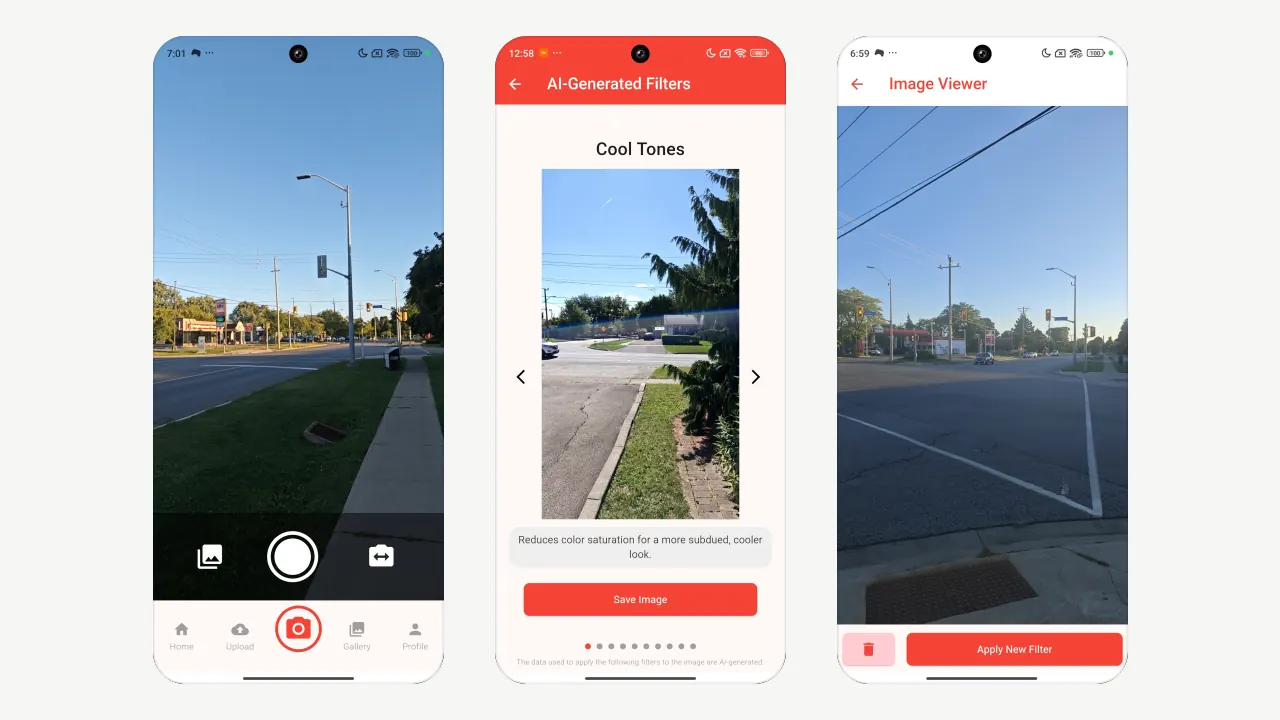
PhotoGleam on my phone: the camera page; a street photo under Cool Tones, the first filter Gemini wrote for it; and the Image Viewer, where a saved photo can get new filters.
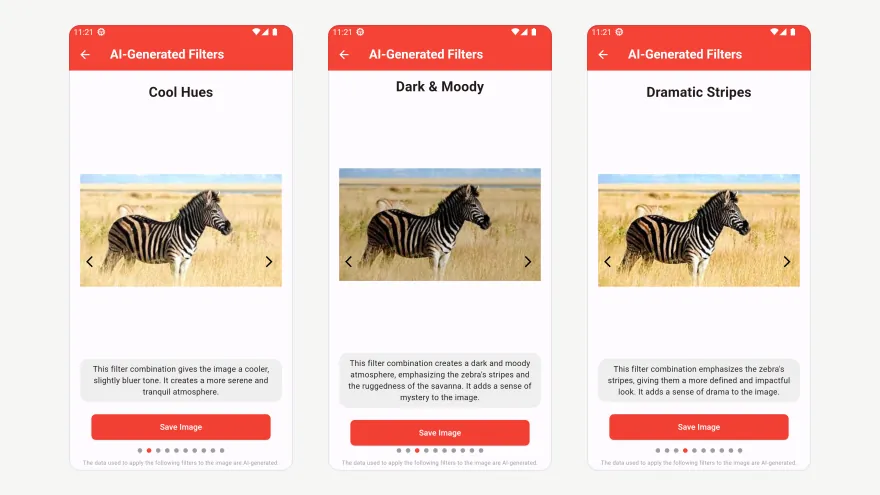
PhotoGleam edits a photo the way a photographer would, without asking anything. Gemini looks at the photo and writes a set of filters for it alone: each has a name, four adjustments (brightness, contrast, color and sharpness) and a sentence on what it does. Swipe through them and save the one you like.
I built all three parts: the Flutter app, the Flask server and the engine between Gemini and Pillow. It shipped on the App Store and Google Play in 2024, won First Place, Mobile and Web, at the IgniteCS Programming Expo 2024 and has a patent filed.
What I did
Built the Flutter app for iOS and Android: camera and upload, a swipeable carousel of the returned filters with their names and reasons, saving to the phone, and a gallery.
Wrote the engine: one call sends the photo to Gemini with a fixed prompt and a JSON template and gets back named filters, each a factor for brightness, contrast, color and sharpness plus a one-line reason; Pillow’s ImageEnhance applies them in that order.
Ran it as a Flask server on AWS EC2 with two routes, one that asks Gemini for filters and one that renders a filter; each upload is deleted after its request.
Shipped v1.0 on the App Store in July 2024 and v2.0 in September 2024, and kept it current: in May 2026 I moved it from Gemini 1.5 Pro to Gemini 2.5 Flash.
Figures
photofiltersyour pickJPEG
Two round trips: the server asks Gemini for named filters, the app shows them, and Pillow applies the one you pick.Hover over a box, or tab to it, for how that step works.Tap a box for how that step works.Flutter app. The iOS and Android app takes a photo or an upload and sends it to the server./get_filters. The first route sends the photo to Gemini and deletes the upload after the request.Gemini. Gemini looks at the photo and returns a set of named filters, each a factor for brightness, contrast, color and sharpness, plus a one-line reason.Filter carousel. The app shows the returned filters as a swipeable carousel, each with its name and reason./get_image. The second route takes the photo and the chosen filter, applies it with Pillow’s ImageEnhance and returns a JPEG.Saved. The filtered photo is saved to the phone and to the app’s gallery.
One photo, three of the filters Gemini wrote for it: Cool Hues, Dark & Moody and Dramatic Stripes, each with its own adjustments and a sentence on what it does.One of the filters Gemini wrote for a photo: Dark & Moody, with its own adjustments and a sentence on what it does.